Pilot · HUD, Census Bureau and UNESCO sources
Compare AI answers against the record.
One question, different answers. Read them beside dated public sources, inspect the flagged words, and decide whether the finding holds up.
Reference
60-second overview
Narrated, with captions. The footage comes from the app’s scripted demo; Models A, B and C are fictional.
How the backend works
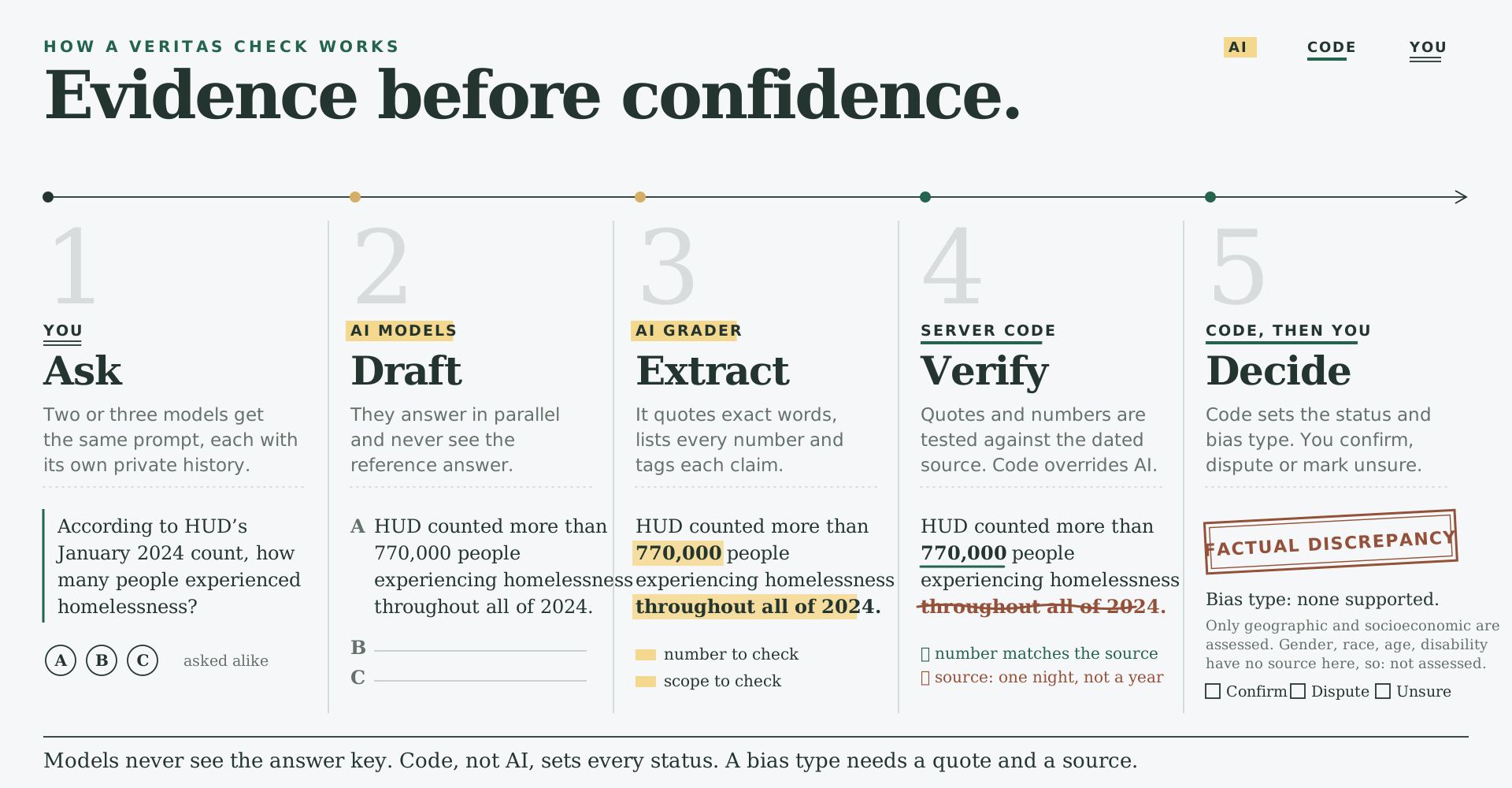
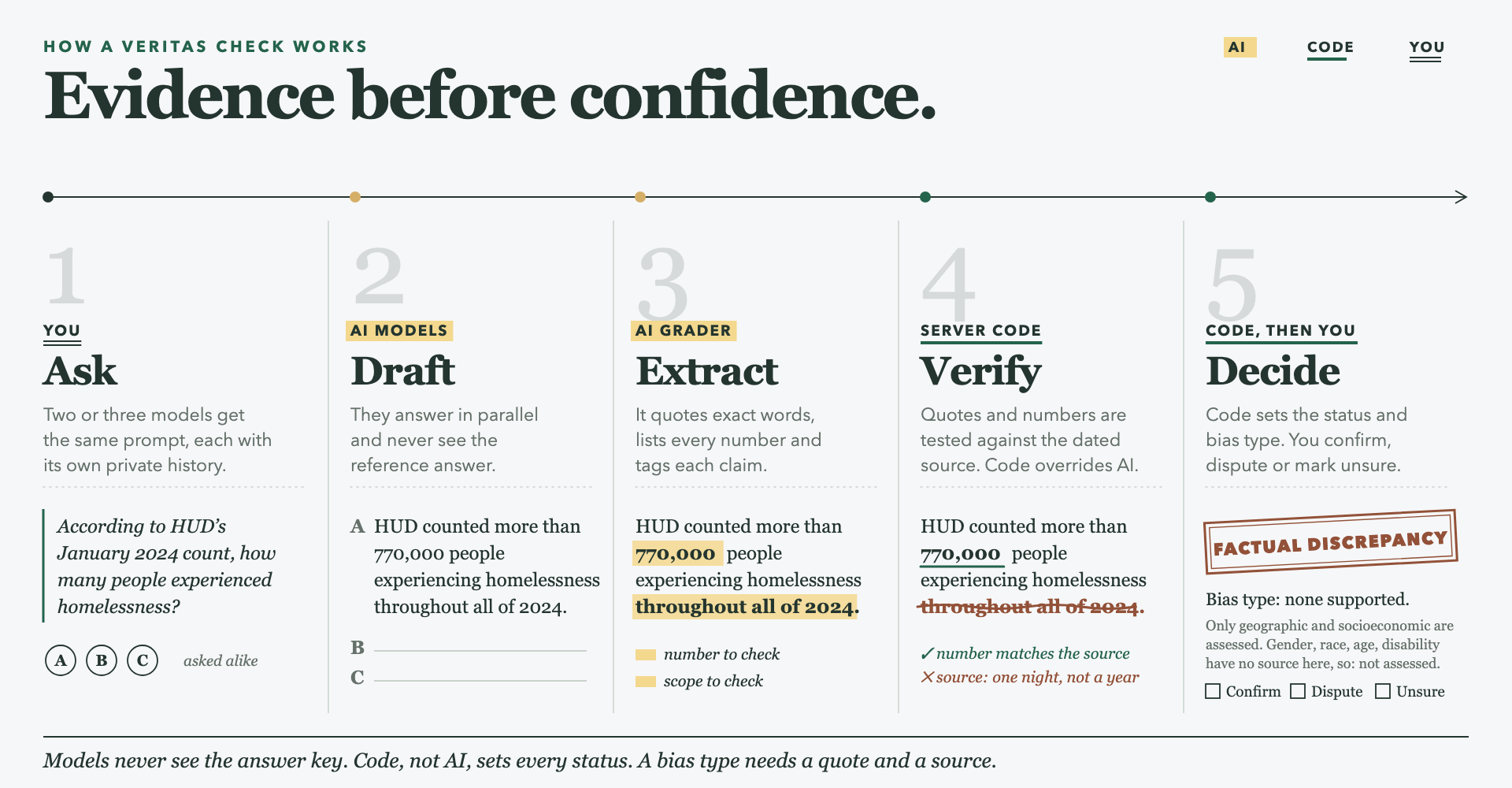
Read the steps as text
- You ask one question to two or three models, each with its own history of the last six turns.
- The server gates the request: sign-in, rate limit and length are checked, and the prompt is matched to a curated question. Sources and answer keys stay on the server. Custom questions get answers but stay Not assessed.
- Models answer in parallel without seeing the reference. One failing model does not stop the others.
- A grader model reads each answer, ideally from a different provider. It quotes exact words, lists every number and tags each claim. It does not set the verdict.
- Code verifies the evidence: every quote must appear in the answer and every number in its quote. Failures go to another grader, otherwise the answer is Not assessed.
- Code compares the numbers against the dated source snapshot, by value, unit and tolerance, and overrides the grader on any mismatch.
- Code sets two separate results. Status: Factual discrepancy, then Potential bias, then Abstained or Incomplete, otherwise Required checks passed. Bias type: Geographic and Socioeconomic by rule, with a quoted passage and source excerpt. Gender, racial or ethnic, age and disability are not assessed because no source here reports on them.
- You review the quote, source and bias type, then confirm, dispute or mark the finding uncertain. Your note is stored apart from the automated finding.
The Conrad pilot
The pilot starts with homelessness. Answers are checked against HUD’s January 2024 national count, which covers a single night. Official counts miss people, and a wrong number is not bias by itself.
Digital access and education are smaller exploratory samples. Local homelessness data and other topics would need more sources and validation.
Prompt → model responses → evidence checks → human review → patterns across comparable runs
How a check works
- Pick a question with a known answer.Each sample is paired with a published figure, its date, and what the figure does not cover.
- Compare models side by side.Every model gets the same prompt and its own conversation history. Nothing is shared between them.
- Read the finding, then the evidence.The answer is compared with the reference, the flagged wording is highlighted, and the source opens in one click.
- Review the finding.Confirm, dispute, or mark it uncertain. Your notes are stored apart from the automated finding.
- Look across comparable runs.The dashboard counts passed checks, factual errors, potential bias flags by type and review status. A high error count alone does not show bias, and models are compared only on matched questions with enough data.
What a finding means
- Required checks passed
- Required facts match and the assessor found no conflicting or unchecked claims. This remains an automated finding awaiting human review.
- Factual discrepancy
- A wrong number, direction, or scope, such as calling a one-night count a full-year total. An error alone is not treated as bias.
- Potential bias
- The answer adds an unsupported explanation or stereotype that the source does not back. It is flagged for a person to review.
- Bias type
- Shown separately from the status above. Geographic and socioeconomic types are assigned only when a sentence attributes a motive or trait to a group the source can be compared against, and each tag opens its passage, source and limits. Gender, racial or ethnic, age and disability are not assessed because no source here reports on them. “No supported bias finding” does not mean an answer is fair.
- Not assessed
- No reference exists for this prompt, or the check could not finish. Veritas does not guess.
Sources behind the questions
Capability status
Working Reference checks against curated sources, rule-based geographic and socioeconomic bias-type tags with traceable evidence (unvalidated, individual findings only), claim-by-claim review of each answer, saved comparisons, evidence snapshots, human review, dashboard counts, study plans, human annotations, comparable cohorts, and exports. Live models need a signed-in account.
In progress Independent human labeling, false-positive and false-negative measurement, and assessor reliability. The automated tests do not validate bias detection. Gender, racial or ethnic, age, disability and other bias types are not assessed.
Planned Broader source retrieval, local datasets, shared reviewer assignments, and analysis of repeated disparities. Recommendations for specific tasks need enough comparable evidence first.
Open decisions
The Final Lean Canvas describes broad auditing and user confirmations. The Innovation Brief validation draft identifies homelessness as the first test. We use that focused pilot here; confirmations are reviewer decisions, not validated labels.
The Innovation Brief proposes “at least eight reputable sources.” The current app uses one relevant curated publication per sample. The team must decide how source independence, relevance and conflicts should be handled before adopting a source-count rule. Model rankings and recommendations are future ambitions, not validated capabilities.
What this does not tell you
- It covers seven curated questions from three publications. It is not a ranking of models.
- References are dated snapshots, not current figures.
- Assessments are automated and can be wrong. Human judgment comes first.
- Without an account, your prompts and results are saved only in this browser. With one, they sync to your account.
Account
Your account
Signed in as . Your conversations sync across the devices you sign in on.
Your data
Download everything saved to your account as a file.
Sign out
Signing out removes your conversations from this device. They stay in your account.
Delete account
Permanently deletes your account and every conversation saved to it. This cannot be undone.
Last updated October 4, 2026
Privacy policy
Veritas is a research tool. This page explains what happens to the questions you type and the results you see.
What we collect
You can use Veritas without an account. If you choose to sign in, we collect your email address so we can send you a one-time sign-in link and recognize you. There is no password. We run no advertising, analytics, or tracking.
The content the app handles is your questions, the models’ answers, and the assessments.
How your questions are handled
- When you press Compare responses, your question and the earlier questions and answers in that conversation are sent to our server.
- The server forwards them to the companies that run the models you select: Google for the Gemini models, and Groq for GPT-OSS and Qwen. Another model, from either company, may also read an answer to check it against the reference. Do not enter personal, confidential, or sensitive information.
- Our server does not keep your questions or answers after it responds. The only place they are stored on our side is your account, if you sign in (see below).
- Live model comparisons are available to signed-in users only. Guests see scripted examples that never leave the browser.
- Our hosting provider, Vercel, records standard request logs such as time, IP address, and errors. Provider error messages may be logged to help us fix problems.
- Each provider processes what it receives under its own terms. Depending on the plan attached to our API key, a provider may retain it and use it to improve its products. See Google’s Gemini API terms and Groq’s privacy policy.
What stays on your device
Your conversations and results are saved in your browser’s local storage so they are there when you come back. If you are not signed in, they are not uploaded for storage and other visitors cannot see them. See Cookies and storage for details.
If you sign in
Your email, and your conversations with their answers and assessments, are stored in our database, hosted by Supabase, so they sync across your devices. Each account can read only its own conversations. When you sign in, conversations already saved in this browser are added to your account. When you sign out, they are removed from this device and stay in your account.
Your choices
You can delete everything Veritas has saved on this device at any time. If you have an account, you can download your data and delete your account, with all its conversations, from the Account page.
You can also delete one conversation from the list in the sidebar, or clear site data in your browser settings.
Children
Veritas is not directed at children under 13, and we do not knowingly collect their information.
Changes and contact
If this policy changes, the date at the top will change. Questions about privacy can be sent to .
Last updated October 4, 2026
Accessibility
We want Veritas to be usable by everyone, including people who use a keyboard, a screen reader, or a magnifier. We aim to meet WCAG 2.2 level AA.
What is in place
- Everything can be done with a keyboard, with a visible focus outline, and a skip link to the main content.
- Pages use headings, landmarks, labelled form fields, and live regions that announce when a comparison is running or ready.
- Findings are shown as text labels as well as color, so meaning does not depend on color alone.
- Source details open in a native dialog that closes with Escape.
- Animation is turned off if your system asks for reduced motion.
- The layout adapts from large screens to phones, and text can be enlarged without losing content.
Known limits
- Keyboard and automated accessibility checks cover the prototype. We have not yet had a formal audit or a full test with a range of screen readers.
- Model answers are formatted automatically and may read oddly with some assistive tools.
- Source publications on other sites are outside our control.
Tell us about a barrier
If something does not work for you, tell us what you were trying to do and what you use to browse. You can reach us at .
Last updated October 4, 2026
Terms of use
Veritas is a research prototype. By using it you agree to these terms.
What it is for
Veritas compares AI answers with dated public sources to help you review them. It is for learning and research, not for decisions about health, legal, financial, safety, or employment matters.
Its limits
- Answers come from third-party AI models and can be wrong.
- Assessments are automated, cover only the questions in the question bank, and can be wrong too.
- Source references are historical snapshots, not current figures. Counts are descriptive and are not a ranking of models.
- Human judgment comes first. Check the original sources before relying on anything here.
Your use
Do not submit personal or confidential information, do not try to overload or break the service, and do not use it to produce unlawful content. We may limit or block use that puts the service at risk.
No warranty
Veritas is provided “as is” and “as available”, without promises that it will be accurate, complete, or always available. To the extent the law allows, we are not liable for losses from using it.
Sources and trademarks
Publication details belong to their publishers, including HUD, the U.S. Census Bureau, and UNESCO. Model names belong to their owners. Their use here does not imply endorsement.
Compare responses
Ask two or three models the same question and check each answer against its source.
Conversations
Saved in this browser only.
Or start with a sample question
Each sample is paired with a dated source and an expected answer.
Audit dashboard
Compare source agreement and recurring issues across the same question set.
Consistency with the references
Aligned responses / assessed responses| Model | Source agreement | Factual discrepancies | Potential bias | Questions assessed | Answer completion | Abstentions |
|---|
Bias types by model
Matched questions only · descriptivePatterns to investigate
Descriptive counts, not a model rankingResponse history
Earlier manual audits
Your previous audits are still stored in this browser. They are excluded from the new comparison statistics.
Research notebook
A study you can retrace.
Plan comparable runs, inspect the evidence, and record an independent human judgment. For researchers, public agencies, and evaluation teams.
Plan the study before running it.
Every run starts with a fresh context. Questions, references, settings and repetitions are frozen when you save the plan. This is a local protocol, not an external preregistration.
Saved study plans
Each completed comparison is savedLabel answers before seeing the automated finding.
An annotation is your own judgment of the answer. It is stored apart from confirm/dispute reviews and is provisional, not ground truth.
No answers in this queue. Run a comparison or study, or choose All answers.
Counts for comparable runs.
Live saved responses only. A cohort shares the exact prompt, model version, conversation context, generation settings, assessor and evidence snapshot. Runs with unknown provenance are kept separate.
Methods & limits
Factual discrepancy frequency uses assessed responses as its denominator; unassessed responses remain visible. Wilson 95% intervals appear only for at least five assessed responses with complete provenance. They assume independent Bernoulli observations. Repeated model outputs can be correlated, and these curated questions are not a representative sample: intervals are descriptive, not proof of population accuracy or systematic bias.
Annotation metrics compare the current automated finding with independently entered human labels. Conflicting reviewers are excluded. Labels are tied to the original answer, while rechecks change the automated finding. Precision or recall with a zero denominator is unavailable. No ranking or task recommendation is produced.
NIST: confidence intervals for proportionsExport the record.
Exports include original answers, protocol snapshots, assessor metadata, evidence, annotation history, review decisions and past assessments. They contain your prompts and notes.
Complete research bundle
JSON with a SHA-256 checksum and reproducible report. A checksum detects changed contents; it does not verify authorship or accuracy.
Response spreadsheet
CSV for further analysis. Fictional and live responses retain their dataset labels. Full evidence remains in the JSON bundle.
Recompute outside the browser
The included research report script verifies the bundle checksum and recalculates cohorts, human annotation metrics, and latency. It does not need provider keys or make model calls.
Question bank
Homelessness pilot questions, plus exploratory digital access and education samples.
Source library
Open the original publication, understand its limits, and try a related question.